In the app
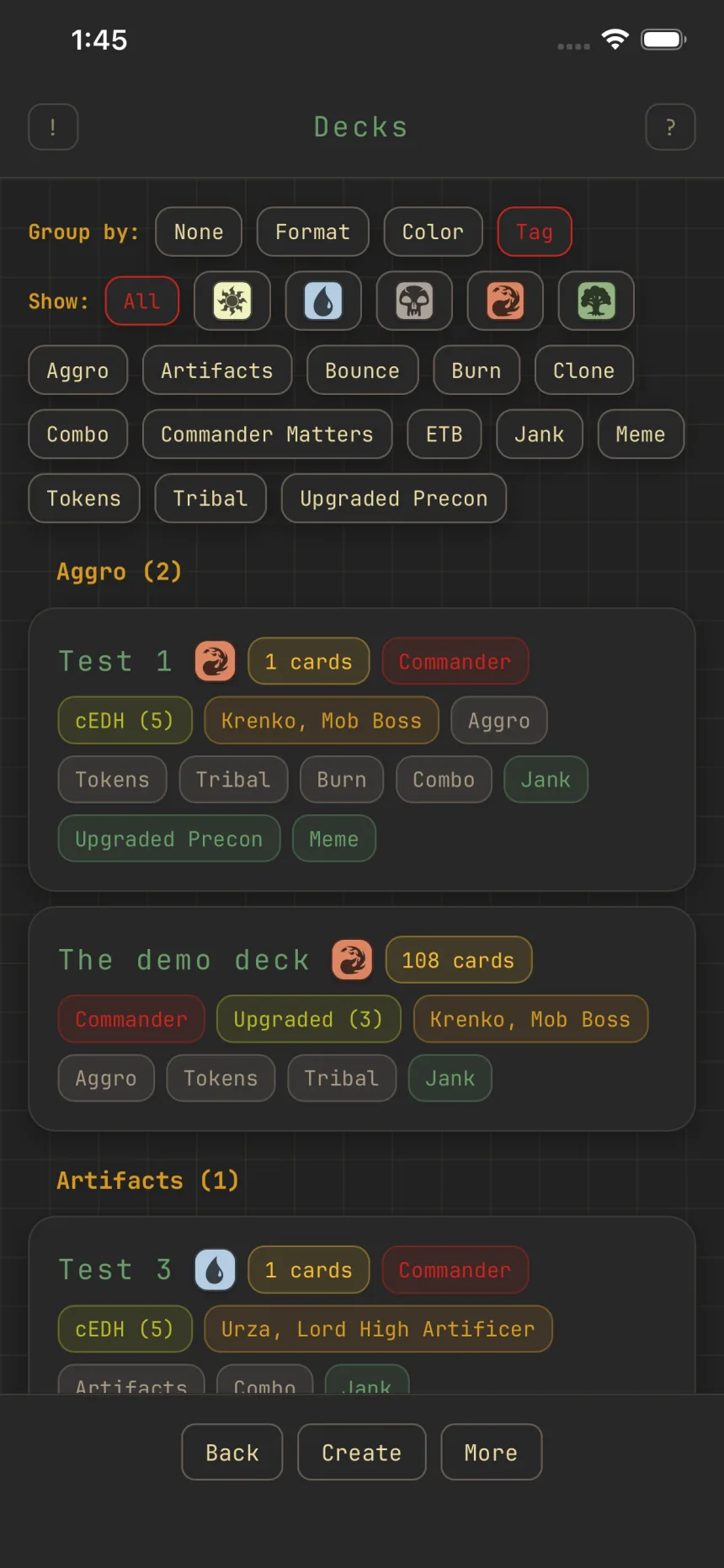
Group, filter, and browse your lists
Two screens have controls that change what you see: your deck list, and each deck's card list. They work the same way on both.
The deck list
Group by folds your decks into sections by Format, Color, or Tag; a deck with several tags appears under each of them. None leaves them ungrouped, which is still one collapsible group headed All. Color makes a group per exact color combination, headed by its mana pips instead of a color word. Show narrows the list: color pips keep decks whose identity contains every pip you pick, tag chips match any of their tags, and All resets.
A deck's card list
Group by sections the cards by Type, Mana value, Color, or Card role, and None leaves them in one list; grouping by Color makes a group per exact color combination, headed by its mana pips. Boards is three independent toggles, Main, Maybe, and Side, so you can read two boards at once; turn the last one off and Main snaps back on. Show toggles Tokens, the Command zone, and Art, which shows or hides card art.
Collapse what you're done with
Tap any group header on either list to fold that section, with the same arrow the card rows use. On the card list, Tokens, Lands, Maybeboard, and Sideboard fold the same way. Collapses last for the visit; everything opens fresh next time.
Quick add
The Quick add bar at the top of the card list searches by name and adds a result to your mainboard with one tap. Results float over the list instead of pushing it around, and the search reaches cards you skipped while swiping.